Wednesday, 15 June 2016

EN RUTA

Acabamos de montarnos en el autobús.
Después de comer hemos tenido juegos deportivos, algo de lluvia y tras la despedida nos hemos subido al autocar. Esperamos llegar en 20 minutos.
Todo bien salvo un mínimo incidente-lesión del fútbol.
Pero sobrevivirá...

BUENOS DÍAS

Estamos llegando al final! 😥
Nos hemos levantado con alguna afonía más, hemos hecho las maletas y a desayunar, lo mismo que todos los días, leche, zumo, bizcochos, galletas, magdalenas y cereales.
Después estamos haciendo juegos en las pistas deportivas y en un rato iremos a la piscina.
A nivel organizativo, os comento, la salida está prevista a las 16:00, con lo que esperamos llegar al cole sobre las 16:30. De todos modos volveré a escribir e incluso el blog cuando estemos subidos en el autocar, para ajustar mejor los tiempos.
Buen día a tod@s

Tuesday, 14 June 2016

ÚLTIMA NOCHE

Bueno, llegamos a la última noche, que corto, ¿no?
Os cuento cómo vamos.
Después de comer, campeonato de ping-pong, con podium y todo. Lo pasamos bien. Después piscina, aunque se nos nubló, pero no había quien nos sacara del agua.
Hemos merendado, ¿os dije ayer que merendamos?, y hemos hecho juegos hasta la hora de la ducha.
Han salido guapetones esperando la disco de la noche. Alguna trajo pintalabios y ha compartido, así que muy guapas ellas también.
La cena de hoy estaba muy rica, ya os contarán (olvidé hacer la foto): guisantes con jamón, empanadillas, rabas y yogur.
Y ahora están todos con los teléfonos hablando con vosotros, algunos afónicos, veremos como llegan a mañana...
Vamos a disfrutar bailando y cantando.

Y YA HEMOS COMIDO

Bueno, ¡esto va muy rápido!
En estos momentos terminamos de comer.
Ya, los dos grupos han hecho tiro con arco y el taller de relojes de sol.
Ya os contaré que tal nos va la tarde...

BUENOS DÍAS

Buenos días a todos!
Después de una buena noche, nos hemos levantado, nos hemos aseado y hemos desayunado. Algunos tenemos cara de sueño todavía pero ya estamos en marcha.
Empezamos un grupo con tiro con arco y el otro con taller, ya os contaremos lo que hemos hecho.
Lo estamos pasando genial...

NOCHE

Por fin llegó la hora.
Después de las actividades de la tarde, se han aseado, han cenado, han tenido un rato de juego libre y después gymkhana nocturna.
Ahora ya están cada uno en su cabaña preparados para dormir...
Buenas noches

Monday, 13 June 2016

MAÑANA Y MEDIA TARDE

Buenas!
Después de acomodarnos en las cabañas hemos empezado las actividades.
Nos han dividido en dos grupos, que somos muchos, unos hemos ido al rocódromo y otros a multiaventura.
Por la tarde haremos lo contrario.
Después, a eso de la una, hemos ido a comer, un rato de juegos y piscina.
Estamos merendando ya y en breve nos vamos a las actividades de la tarde.
Os dejo una foto del menú y otra de la piscina, para que veáis qué mal lo pasamos...

YA HEMOS LLEGADO!

Después de un pequeño atasco, el conductor se las ha apañado para traernos dando un rodeo, así que ya hemos llegado.
Ya les están instalando en las cabañas.
Seguiremos informando!

Wednesday, 25 May 2016

WHAT ARE THE BENEFITS AND RISKS OF USING THE INTERNET?

Benefits:
We have instant access to information.
We can go shopping without leaving home.
It's easy to contact friends and family all around the world.
Risks:
Viruses can damage computers.
Criminals can access and steal information, products and money.
Long periods of computer use can cause health problems.
People sometimes use the Internet to bully other people.
The information on the Internet isn't always accurate.

WHAT'S WORD PROCESSING?

Word processing is a type of software. It can be used to type and edit texts  such as letters, articles, stories and reports. Some examples are Microsoft Word, Writer, Pages, Apache Open Office...
HOW TO EDIT TEXT IN WORD:
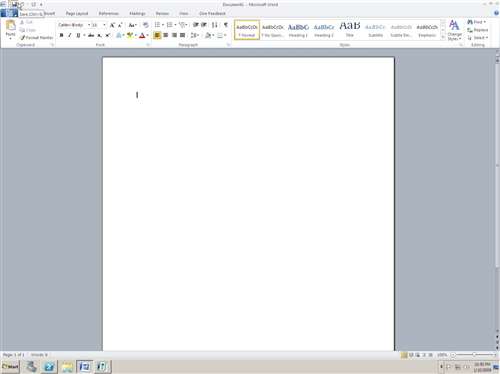
Checking spelling: Words that are spelt incorrectly are underlined in red.
Bold, underline and italics: Highlight the word with the mouse and then click on the bold or italics or underline button in the toolbar.
Creating lists: Highlight the list with your mouse, and then click on the number or bullet point icon in the toolbar.
Cut, copy and paste: To move text, highlight the text with the mouse. Click on the scissors icon to cut it. Then click on the place you want to move it to. Finally, click on the clipboard icon to paste it.
Saving and printing: It's important to save your work regularly. To save a document click on the disc icon in the toolbar. To print it, click on the printer icon.
Changing the font: Select a font from the toolbar.
Photo by IvanWalsh via flickr

Thursday, 19 May 2016

WHAT'S THE INTERNET?

The Internet is a system of computers across the world. These computers are connected to each other in a network.

WHAT'S THE INTERNET USED FOR?
Communication: email, chat rooms, social networks and video-conferencing.
Sharing information: text, images, maps...
Playing games: online and downloadable games.
Banking and shopping.

HOW TO USE THE INTERNET:
What do you need to connect to the Internet? A telephone line, a router, an Internet service provider (ISP), a web browser.
What's a browser? A browser is a computer program that we use to connect to the Internet: Internet Explorer, Chrome, Firefox...
What's a router? A router sends and receives data. By connecting a computer to a router, it can send and receive information from the Internet.
Router, By Evan-Amos (Own work) [Public domain], via Wikimedia Commons

What's an ISP? An ISP is a company that provides access to the Internet (Movistar, Vodafone, Orange...)

WHAT'S THE BEST WAY TO SEARCH FOR INFORMATION ON THE INTERNET?
The Internet has a huge amount of information on many different topics. The best way to find information is to use a search engine (Google, bing, kiddle, bunis...). You introduce a keyword and the search engine gives you a list of links: words or images that take you to web pages with information pages, shopping pages, photos...

HOW DO COMPUTERS WORK?

A computer is a machine that can be programmed with instructions. Computers receive information (input), they carry out a process and they produce output.
HISTORY OF COMPUTERS: The first computer was invented in 1943. It was used to break the codes used by the German army to send messages during World War II. It's name was Colossus because it occupied a whole room.
Ian Petticrew [CC BY-SA 2.0 (http://creativecommons.org/licenses/by-sa/2.0)], via Wikimedia Commons
 In 1971, Intel produced the first microprocessor: a very small programmable device. The invention of the microprocessor led to the production of the first household computers.
By Jamo spingal (Own work) [CC BY 3.0 (http://creativecommons.org/licenses/by/3.0)], via Wikimedia Commons
 In the early 1980s, IBM and Apple began producing personal computers or PCs.

IBM PC 515, By Ruben de Rijcke (Own work) [CC BY-SA 3.0 (http://creativecommons.org/licenses/by-sa/3.0)], via Wikimedia Commons

TYPES OF COMPUTERS:
General purpose machines: they can perform many functions: mobile phones...
Special purpose machines: they perform one specific function: GPS...

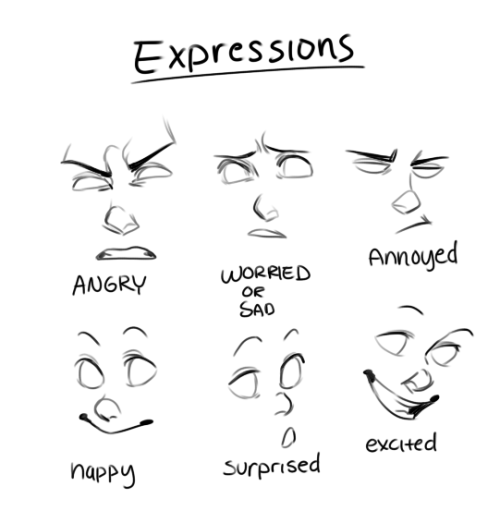
EXPRESSIONS

Photo from: http://art-tutorials.tumblr.com/post/55179077762/captainsart-heres-some-tips-of-course-nothing

HOW HAVE INVENTIONS CHANGED ART AND MUSIC?

Many artists now use computer software to produce their work. Musicians digitalise music, so they can change the pitch and tone of the music by using modern technology. Digital recording makes it possible to mix different tracks to produce a new version of as ong. Instruments can be added or removed from the recording.
By Rebecca Wilson (originally posted to Flickr as Vicariously) [CC BY 2.0 (http://creativecommons.org/licenses/by/2.0)], via Wikimedia Commons

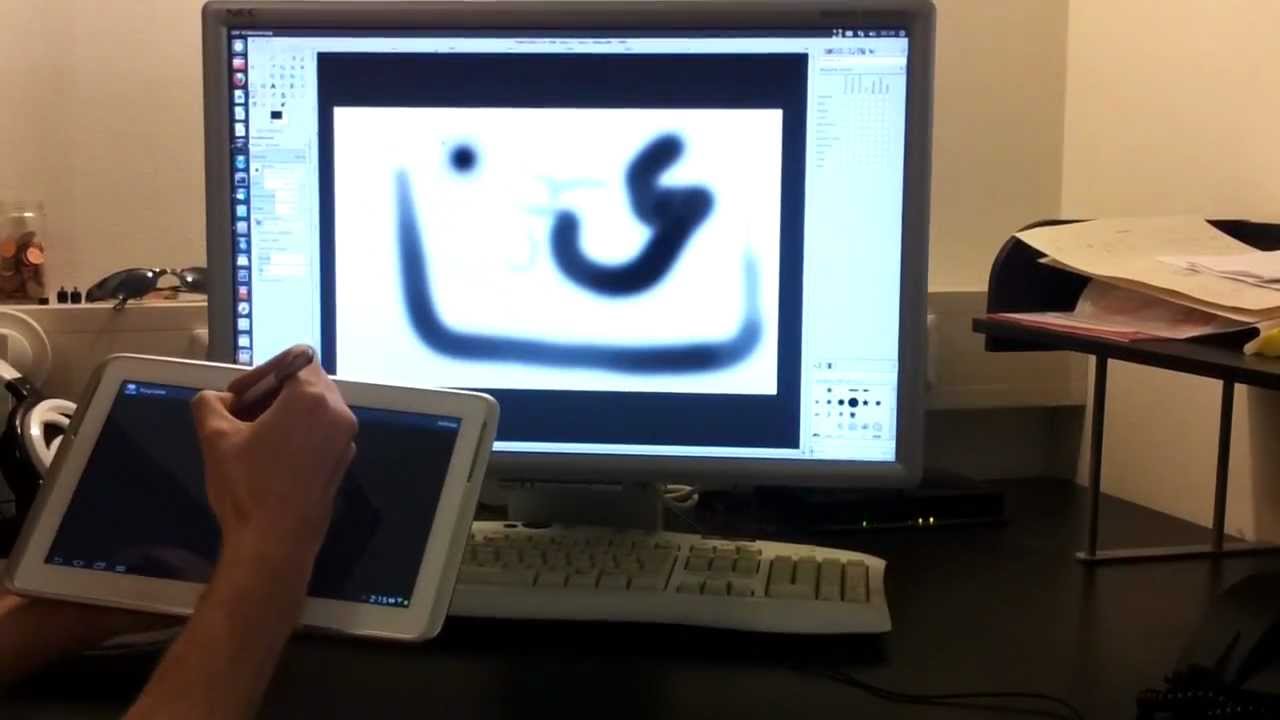
Other artists use modern software and technology to produce digital images. They use stylus and touch-sensitive pads to draw or to edit digital images.
Photo via youtube

There are many inventions to help us doing exercise: running machines, exercise bikes, rowing machines, heart rate monitors...
By Tomwsulcer (Own work) [CC0], via Wikimedia Commons

Thursday, 5 May 2016

MODELO DE EXAMEN DEL TEMA 14

Hola, aquí os dejo el modelo de examen para el tema 14 de matemáticas:
Y aquí os dejo las soluciones:

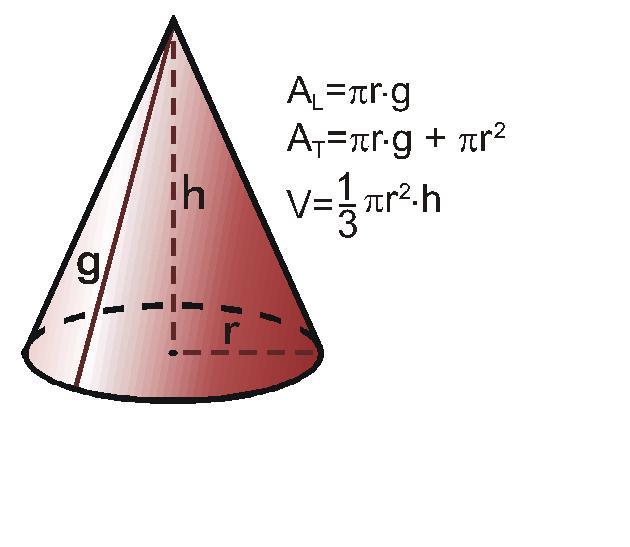
AREA Y VOLUMEN DE UN CONO

Aquí está la fórmula que necesitamos para calcular el área y el volumen de un cono:

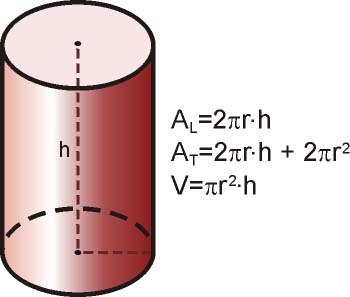
ÁREA Y VOLUMEN DE UN CILINDRO

Aquí tenéis las fórmulas para calcular el área y el volumen de un cilindro:


ÁREA Y VOLUMEN DE UNA PIRÁMIDE

Aquí os dejo esta imagen que os explica cómo calcular ambas cosas.

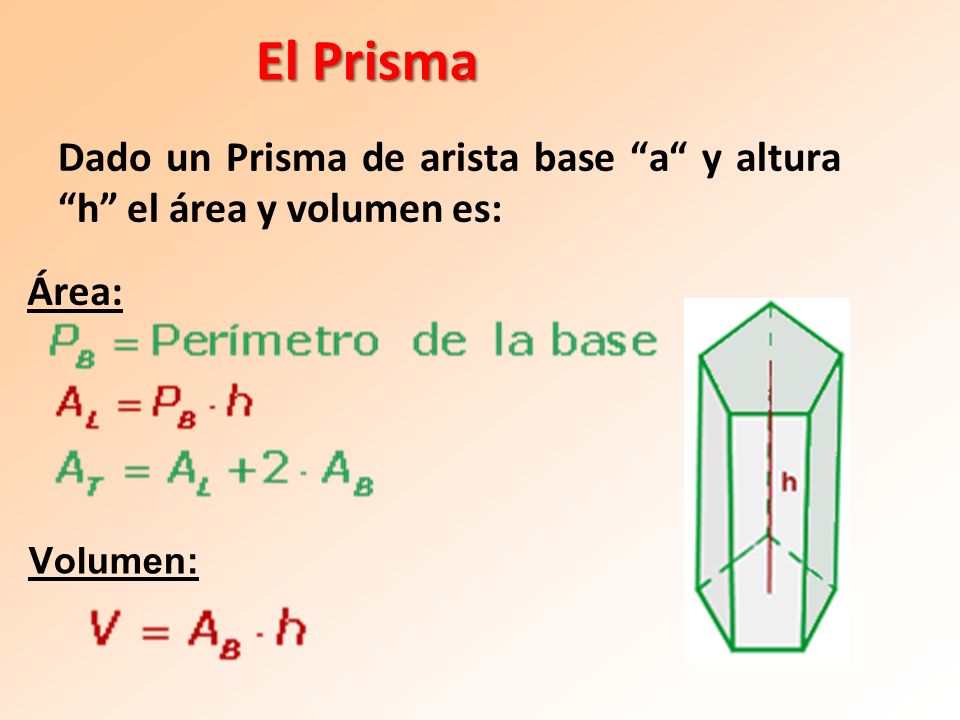
ÁREA Y VOLUMEN DE UN PRISMA

Hola,
aquí os dejo esta imagen que explica como se calcula el área de un prisma y también el volumen.

WHAT INVENTIONS DO WE USE IN OUR DAILY LIVES?

Inventors design machines to solve problems or to make something easier to do.
Modern machines have changed the way we live in many ways:
  • Food production: machines have changed the way the food is prepared in large factories, sometimes it has been frozen or packaged in a tin, so it stays fresh for longer periods of time.
    Cheese production. Photo By No machine-readable author provided. MatthiasKabel assumed (based on copyright claims). [GFDL (http://www.gnu.org/copyleft/fdl.html) or CC-BY-SA-3.0 (http://creativecommons.org/licenses/by-sa/3.0/)], via Wikimedia Commons
  • Clothing: most of our clothes contain synthetic fabrics (nylon, viscose). So they're cheaper, more resistant to temperature than natural fabrics and they do not wear out so quickly. 
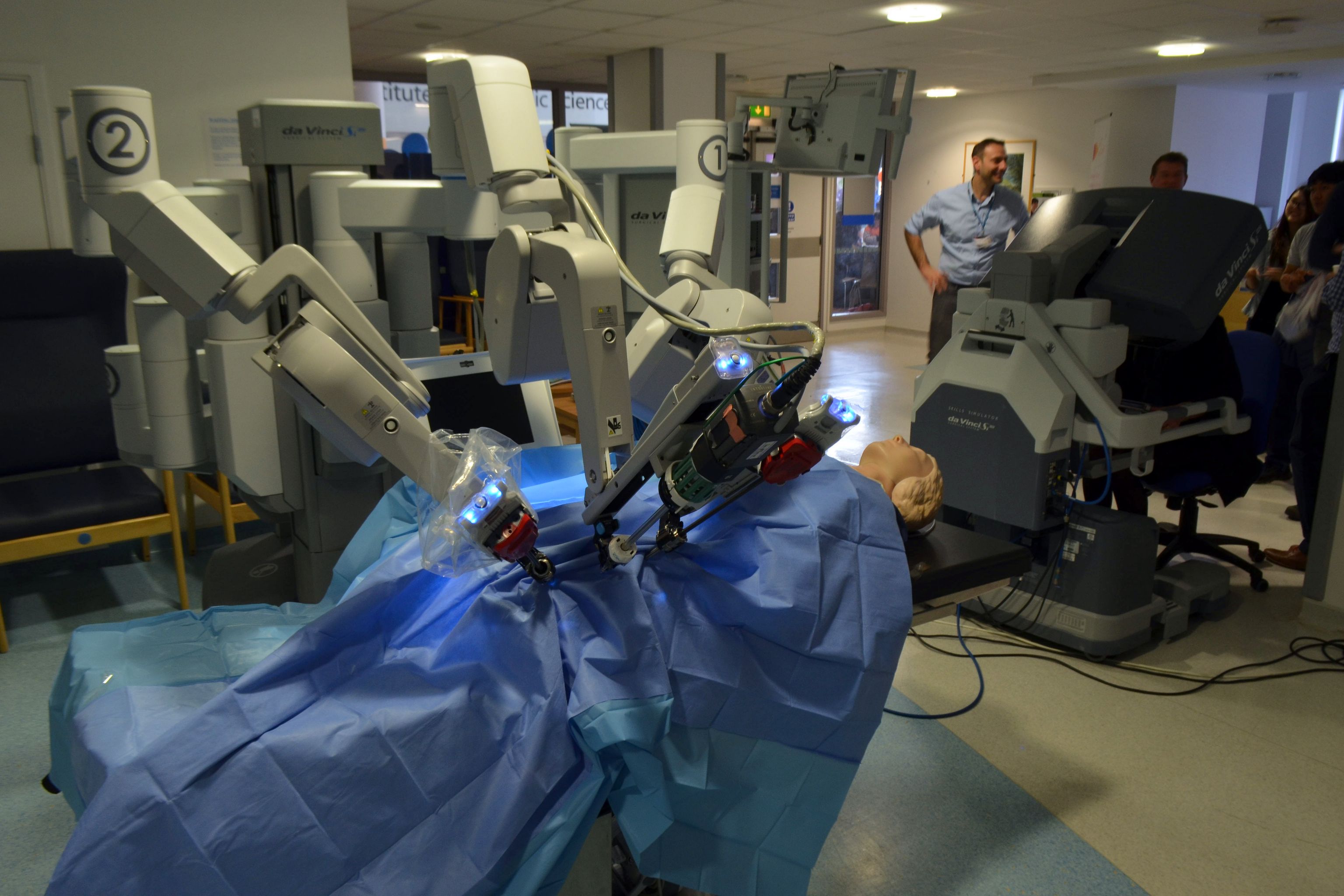
  • Healthcare: Doctors use microscopes, computers, X-ray machines and scanners...
    By Cmglee (Own work) [CC BY-SA 3.0 (http://creativecommons.org/licenses/by-sa/3.0) or GFDL (http://www.gnu.org/copyleft/fdl.html)], via Wikimedia Commons
Many inventions have changed the way we travel:
The bicycle, cars (before the invention of cars we travelled by horse and carriage), steam engine, the hovercraft, aeroplanes...